In-line Spell Checking with Opera
Last updated: Jun 16, 2008I love Opera and I am excited to be using the latest version Opera 9.5 that came out just a few days ago. With the new features, fixes, and new Dragonfly Webdeveloper Tool I believe that Opera is pulling away from the competiton and has always been in my opinion faster and better than Firefox or other browsers.
The only feature that I miss about Firefox was the in-line spell checking. Sure Opera has spell checking built into the browser but it doesn’t highlight mispelled words and it can be difficult to spell check a large document as you never know which word in the document it is trying to correct. I will be the first to admit that Firefox’s spellcheck system is much more intuitive and easier to use.
This is a small flaw that I have found that I don’t like about Opera but it isn’t enough for me to switch to Firefox or even worse, Internet Explorer. After doing a quick search I found a great script that will add in-line spell checking to Opera in about 30 seconds.
Installing the script
First we need to make a folder that stores the script and any other script we may use in the future. I like to use the Opera directory to store my scripts so I always know where they are. This also makes sense because if I remove Opera in the future my scripts will also be removed. Create a folder called ‘UserJS’ here:
OperaDefaultPath\Opera\program\plugins\
Usually it is:
C:\Program Files\Opera\program\plugins
Then download the OSpell script to add the in-line spell checking. Save the file in the newly created folder, ‘UserJS’.
After you have saved the script we need to tell Opera where to look for it.
Go to Tools > Preferences > Advanced > JavaScript Options
Where is says User JavaScript Files click Choose and point to the folder we created (’UserJS’).
Save your settings and restart Opera. You will now have a nice in-line spell check button at the bottom of every text area form. In order for the button to show up you will have to click in the text area.
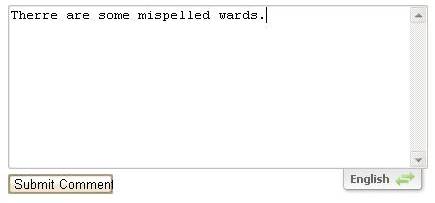
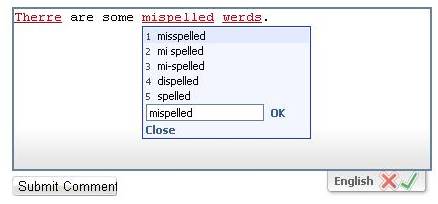
I am not sure why Opera hasn’t come up with a better solution for spell checking. They are usually ahead of the game when it comes to new features. Thankfully I found a script that added the in-line spell checking.
Need to print shipping labels on your site?
Checkout my product RocketShipIt for simple easy-to-use developer tools for UPS™ FedEx™ USPS™ and more.