Extract without First Directory
Last updated: Jan 6, 2009Whenever I download something that is compressed on the Internet in a .zip, .rar or .tar.gz it is always a crapshot whether or not it contains a “container directory”. A “container directory” is a directory that contains all the other files usually with the same name as the compressed file.
For example the Zend Framework when downloaded contains a folder called, ‘ZendFramework-1.7.2’. All the other files are contained under this folder. This is great but sometimes I want to extract the contents of the folder without the “container folder”.
This is how I used to extract the contents and remove the “container folder”:
tar -xvf ZendFramework-1.7.2.tar.gz
Get rid of the tarball…
rm ZendFramework-1.7.2.tar.gz
cd ZendFramework-1.7.2/
Which would result in:
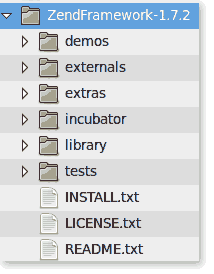
Copy everything in the “container” folder and move it up a directory.
cp -rf * ../
Now I have found a better way…
A better way
The flag that I have learned is the strip flag. This will strip off the first directory and extract the rest.
tar -xvf ZendFramework-1.7.2.tar.gz --strip 1
The only thing now is… How do I tell if a tar contains a “container folder”?
Easy
tar -tf ZendFramework-1.7.2.tar.gz | head
This will list contents of the file ‘ZendFramework-1.7.2.tar.gz’ showing only the first few lines.
What do you think? Is there an even better way?
Need to print shipping labels on your site?
Checkout my product RocketShipIt for simple easy-to-use developer tools for UPS™ FedEx™ USPS™ and more.