8 Computer Pranks to Use on Your Co-Workers
Last updated: Apr 1, 2008The classic prank. Take a screen shot of their desktop and set their wallpaper to that screenshot. Then hide all the icons by doing a right click > Arrange Icons By: > Show Desktop Icons.
Modify C:\WINDOWS\system32\drivers\etc\hosts to redirect their favorite website to http://youtube.com/watch?v=eBGIQ7ZuuiU
Change their keyboard layout to dvorak.
Open control panel
Open the ‘Regional and Language Options’ applet
Select ‘Languages’ tab, click ‘Details’ button
Click ‘Add’ check the ‘Keyboard Layout/IME’ box
Make sure ‘United States-Dvorak’ is selected and click ‘ok’
Under the ‘Default Input Language’ section at the top of the ‘Text Services and Input Languages’ window, select the Dvorak option
Hit ‘ok‘
Hold the left ‘Alt’ key and hit ‘Shift’ to switch back and forth between the Dvorak layout and normal keyboard layout
Even those with some computer experience will have a hard time figuring this one out.
- Create an AutoIT script that will eat away one space bar key stroke every 4 presses.
Opt("TrayIconHide", 1)
HotKeySet("{SPACE}", "EatPress")
While 1
Sleep(100)
WEnd
Func EatPress()
$i = Round(Random(3))
If $i < 3 Then
HotKeySet("{SPACE}")
Send("{SPACE}")
HotKeySet("{SPACE}", "EatPress")
EndIf
EndFunc
- If you have a linux computer on your network that can print, you can have it print random sayings at 10 minute intervals.
#!/bin/bash
COUNTER=0
while [ $COUNTER -lt 10 ]; do
sleep 10m
fortune | lpr
let COUNTER=COUNTER+1
done
 Change the users cursor with a middle finger icon every 5 seconds with this nifty software. To close it just move your cursor to the top left corner for a few seconds.
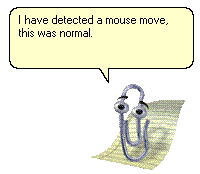
Have them see random messages from good ol’ Mr. Paper Clip.
- Give someone a heart attack by setting their LCD montitor background to this.

Need to print shipping labels on your site?
Checkout my product RocketShipIt for simple easy-to-use developer tools for UPS™ FedEx™ USPS™ and more.