Mastering the UPS Shipping API: Rate Shopping Dropdown
Last updated: Dec 19, 2008One of the first parts of the checkout process of any ecommerce site is to provide the customer with a dropdown box with shipping options. In this tutorial we are going to shop for various UPS rates and display them in a convenient drop down.
If you are new to the UPS API first read this article, Mastering the UPS Shipping API: Getting Started. You will need to have access to UPS’s online web tools. You can register here.
Getting ups-php
The first step is to go and get ups-php. For this guide we will use the latest code by downloading it with svn.
mkdir ups-php
svn checkout http://ups-php.googlecode.com/svn/trunk/ .
Once downloaded you will notice that there is a folder called tests inside of tests there are rates and tracking. In rates there is a file called test_shopRates.php. This file contains a working sample test code. Simply enter your UPS credentials and hit submit.
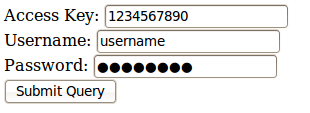
You will than have a big giant array with tons of information available to us.
Getting the correct values
With all this information what do we really need to get to the bottom of the line and display a simple dropdown with a couple of shipping options?
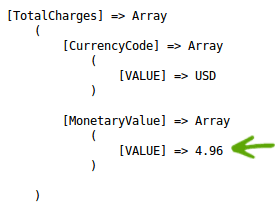
We need the total charge for the package:
And the UPS service code:
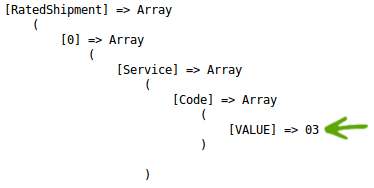
Now we have the required information. We know that the total charge for the package is in the hashed array:
$response['RatingServiceSelectionResponse']['RatedShipment'][0]['TotalCharges']['MonetaryValue']['VALUE'];
And that the UPS Service Code is in this hashed array:
$response['RatingServiceSelectionResponse']['RatedShipment'][0]['Service']['Code']['VALUE'];
Looping through all the available services
These values are nice but they only represent one of the available services that UPS offers. If you notice in the array hash reference above we have a [0] after [‘RatedShipment’]. This represents the first set in a group of multiple “RatedShipments”.
We need to loop through all of them and display them like this:
$response = $upsRate->returnResponseArray();

foreach ($response['RatingServiceSelectionResponse']['RatedShipment'] as $service) {
    echo $service['Service']['Code']['VALUE']. '<br />';
    echo $service['TotalCharges']['MonetaryValue']['VALUE']. '<br />';
}
This will print out all the UPS Service Codes with the total cost for the service. All we have to do now is add some HTML and put them in a drop down.
<select>
<?php $response = $upsRate->returnResponseArray();

foreach ($response['RatingServiceSelectionResponse']['RatedShipment'] as $service) {
    $serviceCode = $service['Service']['Code']['VALUE'];
    $totalCharges = $service['TotalCharges']['MonetaryValue']['VALUE'];

    echo "<option value=\"$serviceCode\">$serviceCode ($totalCharges)</option>";
}
?>
</select>
You should end up with something like this:
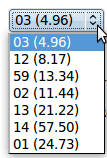
From here all you have to do is convert the service codes to their respective names found in this article, Calculating UPS Shipping Rate with PHP. If you get stuck just go back to the example provided with ups-php, test_rates.php.
Need to print shipping labels on your site?
Checkout my product RocketShipIt for simple easy-to-use developer tools for UPS™ FedEx™ USPS™ and more.